
This guide is for you if you’ve ever seen people having cool or shiny-looking text on Discord and you’re wondering how people do that. Discord Fonts lets you dress up your messages, usernames, and server channels with creativity, personality, and emphasis. In this article, you will learn what Discord fonts are, the easiest way to generate Discord fonts, and how to use those fonts to effective ends. Download HD Stock Photos and Backgrounds Free Guide (Beginner-friendly, No Download or Technical Skill Required)
What Are Discord Fonts?
By Discord fonts, most people are referring to special styles of text that are different than typical typing. There are no built-in features to directly change fonts within Discord itself. Discord fonts are instead made up of Unicode characters. They are special typeset symbols and letters that appear as other font types when copied and pasted into Discord.
Unicode consists of bold, italic , cursive, small text, gothic, etc. These Unicode characters are converted from normal text with the help of font generator tools, and they appear as a new font in Discord. This is also the reason why Discord fonts work from message, to username, to a server’s name and/or their bio – without violating platform guidelines.
By using Discord fonts, you could use a creative way to draw attention in chats, express what you feel, or give your server a unique look.
How to Generate Discord Fonts?
The following steps should allow you to easily create a Discord font using the Discord font generator:
- Use any web browser you would like (Mozilla, Chrome, etc.)
- Search fancytextgenerate.com.
- You now have the Discord font generator available from the homepage.
- After the Discord font generator has opened, type your text in the text box.
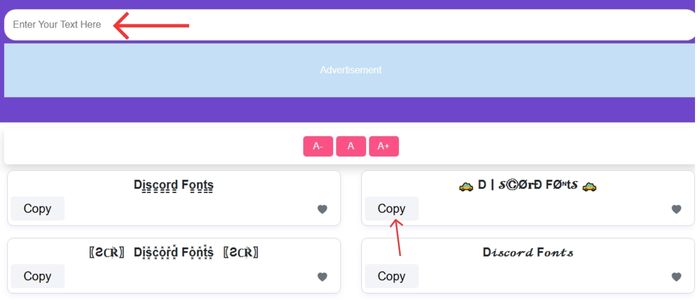
- Click the “Generate” button.
- After clicking Generate, your text will show on your screen in the Discord font.
- The Discord text should be easy to copy and paste anywhere.
Best Uses of Discord Fonts

Here are some of the cool and commonly used methods for using fonts on Discord.
Make Messages Stand Out
Lose messages between active servers. Discord fonts make your text eye-catching and attention-grabbing.
Express Your Personality
Typography is able to express mood and style. Discord Fonts help express your personality , whether you like playful, aesthetic, or other professional text.
Create Unique Usernames
Any fancy font can help us keep in mind your username when scrolling through dozens of others, which is particularly useful for large communities.
Customize Server Channels
Discord Font can be used by server owners to make their channel names look presentable and nice.
Highlight Important Announcements
On the other hand, that makes people know about any update, rules, or event right away if the announcement is written using bold or fancy Discord fonts.
How to Select a Suitable Discord Font
So, whilst you can play around a little, using Discord fonts wisely increases readability:
- Do not use several fonts in a message
- Use Two Or Three Font Styles Maximum
- Use decorative typefaces with simple text
- Fancy fonts should only be used in titles or when you want to emphasize something
This keeps your content fashionable, but not too extreme for readers.
Discord Fonts Are Safe to Use?
So, yes, Discord fonts are 100% safe. They also do not violate Discord rules since they are Unicode characters. But please refrain from using hard-to-read fonts when trying to have a serious conversation; readability is key.
Conclusion
Fancy text discord or discord fonts are a cool and innovative way to enhance the experience of chatting. These Unicode-based text styles aren’t real fonts, but they essentially create Discord fonts for you to use anywhere on the platform. A Discord font generator can be used to enhance texts, customize user names, decorate servers, and make announcements more targeted. Experiment with it now, and may your inner Discord come back out.
Related Tools:
FAQs
Are these Discord fonts real fonts?
They are not real fonts. These unique Unicode characters appear as multiple font styles when copied and pasted into Discord.
Do I have to download anything to use these fancy fonts?
You do not have to download software or applications to use these fonts.
How can I change my Discord font?
Type your text into a font generator website (for example fancytextgenerate.com) to develop a styled version of your text, and then copy and paste the text into Discord.
Are there “fonts” acceptable for my server names or usernames?
Yes! You can change your username, server names, and even channel names with these generated Unicode characters to make your username or server names quirky and unique.
What benefits are there for us when we use different “Discord fonts”?
Use them to make your messages stand out, show your personality, have unique usernames, customize the look of your server, and make important announcements odd.